Government Exam Photo Tool: Universal Resizer for SSC, RRB, UPSC, IBPS
One tool for all government exams. Auto-resize to 20KB-50KB, convert background to white, and get perfect dimensions for SSC, RRB, UPSC, IBPS. Bookmark this - you'll use it for every exam application.
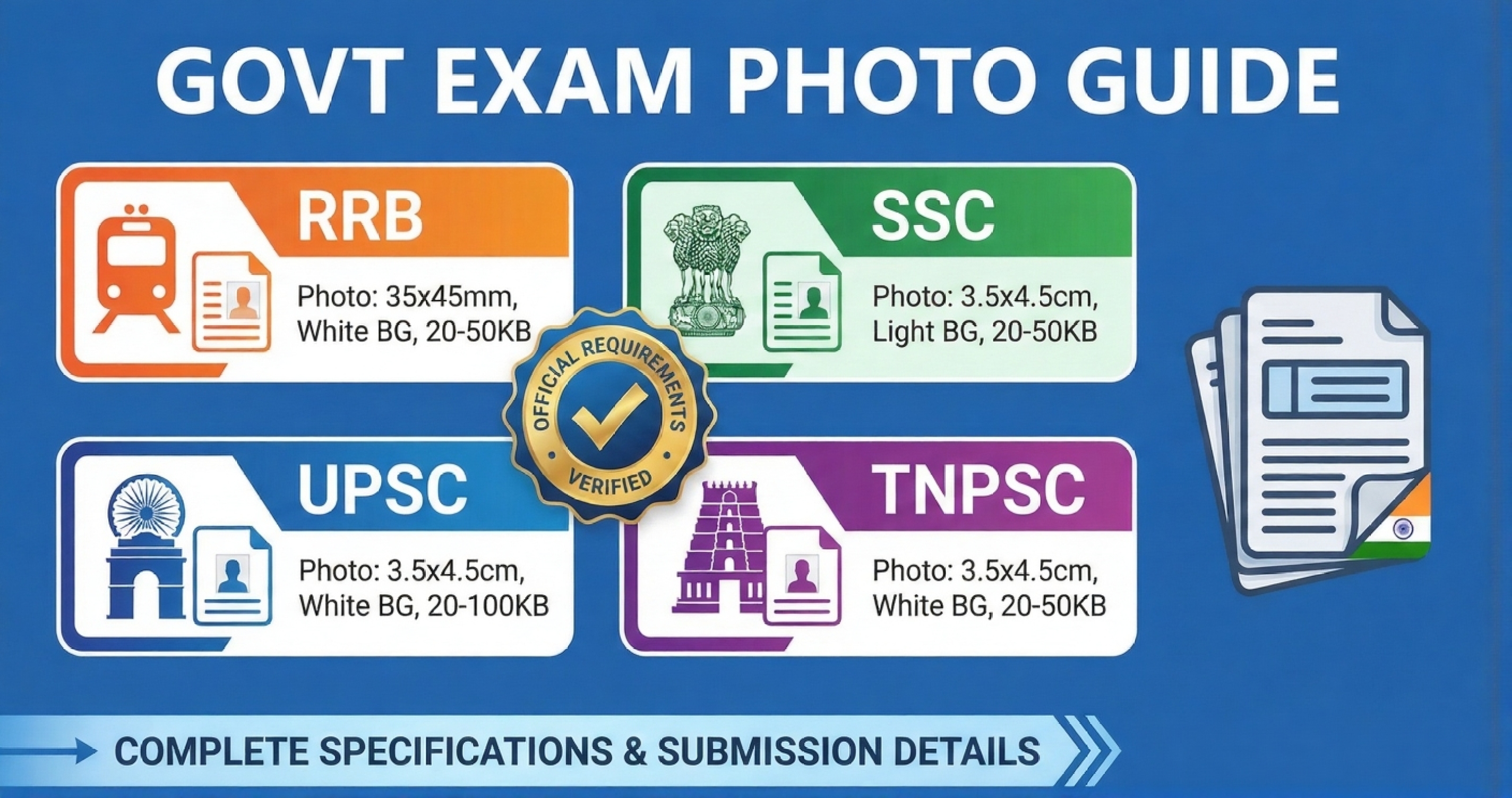
Quick Reference Table
Here's every major government exam's photo requirements in one place. No more hunting through 50-page PDFs.
| Exam | Photo Size | File Size | Signature Size | Format |
|---|---|---|---|---|
| RRB NTPC | 3.5×3.5cm | 20KB - 50KB | 4×3cm, 10KB-20KB | JPG/JPEG |
| RRB Group D | 3.5×3.5cm | 20KB - 50KB | 4×3cm, 10KB-20KB | JPG/JPEG |
| SSC CGL | 4×3cm | 20KB - 50KB | 4×3cm, 10KB-20KB | JPG/JPEG |
| SSC CHSL | 4×3cm | 20KB - 50KB | 4×3cm, 10KB-20KB | JPG/JPEG |
| SSC MTS | 4×3cm | 20KB - 50KB | 4×3cm, 10KB-20KB | JPG/JPEG |
| UPSC CSE | 4×5cm | 40KB - 100KB | 4×5cm, 10KB-40KB | JPG/JPEG |
| UPSC CDS | 4×5cm | 40KB - 100KB | 4×5cm, 10KB-40KB | JPG/JPEG |
| IBPS PO/Clerk | 4.5×3.5cm | 20KB - 100KB | 4×3cm, 10KB-50KB | JPG/JPEG |
| SBI PO/Clerk | 4.5×3.5cm | 20KB - 100KB | 4×3cm, 10KB-50KB | JPG/JPEG |
| TNPSC Group I/II | 3.5×4.5cm | 20KB - 50KB | 4×3cm, 10KB-20KB | JPG/JPEG |
Important: These specifications are updated as of January 2026. Always check the official notification for your specific exam before applying.
One Tool for ALL Government Exams
Stop hunting for exam-specific tools. Our universal photo resizer works for SSC, RRB, UPSC, IBPS, Aadhar, PAN - auto white background, precise dimensions, perfect file size (20KB-50KB). Offline & free forever.
✓ Auto white background • ✓ Exact dimensions • ✓ 20-50KB compression • ✓ 15,000+ candidates
Common Requirements Across All Exams
Despite different dimensions, most government exams share these standard requirements:
Photo Requirements:
- Recent photo (taken within last 3 months)
- Colored photograph only
- White or light-colored background
- Full frontal face, looking at camera
- Both ears visible
- Neutral expression (no smile)
- 80% face coverage in frame
What's NOT Allowed:
- Sunglasses or dark glasses
- Cap, hat, or headgear (except religious)
- Uniform (unless specified)
- Heavy makeup or filters
- Blurry or pixelated photos
- Group photos or selfies
- Printed photos scanned (use digital)
Exam-Specific Details
Railway Recruitment Board (RRB)
RRB is particular about photo quality. They reject applications if:
- Photo is taken with mobile camera and looks unprofessional
- Background has patterns or shadows
- Face is tilted or not centered
- File size exceeds 50KB even by 1 KB
Quick Link: Resize for RRB
Staff Selection Commission (SSC)
SSC has strict signature requirements along with photos:
- Signature must be done with BLACK INK on WHITE PAPER
- Sign on plain paper, scan at 200 DPI minimum
- Signature should not touch borders of the scanned area
- For SSC CGL/CHSL: Signature dimensions exactly 4×3cm
Quick Link: Resize for SSC Signature
Union Public Service Commission (UPSC)
UPSC allows larger file sizes but has specific dimension requirements:
- Photo: 4×5cm (portrait orientation, slightly taller)
- File size: 40KB to 100KB (don't go below 40KB)
- For CSE: Quality matters more than other exams
- Photo will be printed on admit card and visible during interviews
Quick Link: Resize for UPSC
Banking Exams (IBPS, SBI)
Banking exams have the most lenient file size limits:
- Up to 100KB allowed (you can maintain high quality)
- Professional appearance matters - this photo may be used in your ID card
- Formal attire recommended (not mandatory but preferred)
- IBPS shares photos with participating banks
Quick Link: Complete IBPS Photo Guide 2025
Step-by-Step: Perfect Application Photo
1Take Professional Photo
Visit a photo studio (₹50-100) or set up proper lighting at home. White background, good front lighting, camera at eye level. Wear solid colored clothes (avoid white if background is white).
2Check Your Exam's Specific Requirements
Refer to the table above or official notification. Note down exact dimensions and file size range. Different exams = different specs.
3Resize and Compress
Use our exam-specific tools for automatic resizing:
- RRB: RRB Photo Resize Tool
- SSC Signature: SSC Signature Tool
- UPSC: UPSC Photo Resize Tool
- Aadhar Card: Aadhar Photo Resize Tool
- Pan Card: Pan Card Photo Resize Tool
- General (20KB): 20KB Resize Tool
4Verify Before Uploading
Right-click your file → Properties → Check:
- File size is within specified range
- Format is JPG/JPEG (not PNG)
- Dimensions match requirements
- Photo is clear when opened at 100% zoom
Common Mistakes That Lead to Rejection
Using Same Photo for All Exams
Each exam has different dimension requirements. A 3.5×4.5cm photo won't work for an exam requiring 4×5cm. Resize separately for each application.
Uploading Old Photos
"Recent photo" means taken within last 3 months. If your hairstyle, facial hair, or appearance changed significantly, take a new photo. Mismatch during verification = disqualification.
Ignoring Signature Requirements
Many candidates focus on photos but mess up signature. Use BLACK INK on WHITE PAPER, scan properly, resize to exact dimensions. Practice your signature to keep it consistent.
Using Screenshot of Photo
Never take a screenshot of your photo from WhatsApp or Facebook. Always use the original digital file. Screenshots add compression artifacts and metadata issues.
Pro Tips From Successful Candidates
1. Keep Digital Copies Organized
Create a folder with your name and store properly sized photos for each exam. Label them clearly: "YourName_RRB_Photo.jpg", "YourName_SSC_Signature.jpg"
2. Take Multiple Photos in One Session
If you're planning to apply for multiple exams, take 10-15 photos in one studio session. You can resize them differently for each exam later.
3. Upload Early in Application Window
Don't wait for the last day. If your photo is rejected, you'll have time to fix and resubmit. Last-minute rush = higher chance of errors.
4. Test Upload on Different Browsers
Some exam portals work better on Chrome, others on Firefox. If upload fails, try a different browser before panicking.
5. Keep Admit Card Photo Consistent
The photo on your admit card should match your current appearance. Carry the same photo's printout to the exam center for verification.
Frequently Asked Questions
Q: Are spectacles/glasses allowed in government exam photos?
Yes, prescription glasses are allowed in most government exam photos (RRB, SSC, UPSC, IBPS). However, there are conditions: (1) Glasses must be transparent, not tinted or colored, (2) No glare or reflection on lenses - position your head slightly to avoid light reflection, (3) Both eyes must be clearly visible through the lenses, (4) No sunglasses or dark glasses allowed. If you wear glasses during the exam, wear them in the photo too.
Q: What background color is required for RRB NTPC photo?
White background is mandatory for all RRB exams (NTPC, Group D, JE, ALP). Light cream or off-white may be rejected. Tips: Use a plain white wall or white cloth backdrop. Avoid shadows on the background. Don't use blue, gray, or any colored backgrounds - they will be rejected outright.
Q: Should RRB NTPC signature be in blue or black ink?
BLACK INK is mandatory for RRB NTPC and all SSC exams. Blue ink signatures are REJECTED. Use a black ballpoint or gel pen. Sign on plain white paper (not ruled). Scan or photograph at high resolution. Keep the same signature style for document verification during exams.
Q: Is white background photo necessary for RRB NTPC?
Yes, white background is strictly required. RRB specifically states "plain light/white background" in official notifications. Applications with blue, gray, or patterned backgrounds face rejection. Light cream backgrounds have also been rejected in some cases - pure white is safest.
Q: Can I use the same photo for RRB and SSC?
No. RRB requires 3.5×3.5cm (square), SSC requires 4×3cm (landscape). You need to resize separately. Use our RRB Photo Resize Tool andSSC Signature Tool for exact specifications.
Q: What is the SSC Group D photo size?
SSC Group D (now merged with SSC MTS) requires: Photo size 4×3cm, file size 20KB-50KB in JPG format. Signature: 4×3cm, 10KB-20KB in JPG. Always check the latest notification as specifications may vary by recruitment cycle.
Q: Can I edit my photo to remove blemishes?
Minor editing (brightness, contrast) is fine. Heavy retouching, filters, or changing facial features is not allowed. Photo should represent your real appearance.
Q: What happens if my photo is rejected?
Most portals allow re-uploading during the application window. You'll receive an error message explaining the issue. Fix it and upload again before the deadline. Common rejection reasons: wrong dimensions, file size exceeds limit, colored background, or poor quality.
Final Checklist
Conclusion
Government exam photo requirements seem complicated, but they're just about following exact specifications. Bookmark this page and refer back when applying for different exams. Over 100,000 candidates used our guides last year to get their applications accepted on the first try. Your turn now.
Ready to Resize for Your Exam?
Use our exam-specific tools for automatic resizing - no guesswork needed